
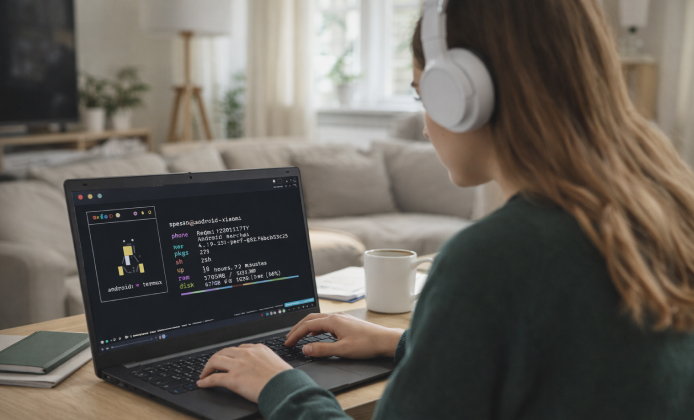
If you enjoy command-line tools, lightweight scripting, and learning Linux-style workflows, Termux can feel like a small powerhouse. Many users want the same flexibility on a larger screen with a physical keyboard, better multitasking, and easier file management. This guide walks through realistic options, smart setup tips, and safe habits for using Termux-like workflows on a computer.
What Termux Brings to a Computer Workflow
Termux is popular because it combines a package manager, terminal utilities, and a flexible environment for programming tasks. On a PC, it can be useful for quick SSH sessions, Git projects, Python experiments, or automation scripts. With the right method, you can keep the familiar feel while gaining the comfort of a desktop setup.
Tip: Treat your terminal setup like a workspace keep projects organized, back up configs, and document commands you run often.
Common Ways to Use Termux-Style Tools on PC
- Android emulator: Run Android inside Windows and install the app normally.
- Subsystem or Linux VM: Use a Linux environment on your PC for similar packages and terminal behavior.
- Remote approach: Use Termux on your phone, then connect from your PC via SSH to manage tasks from a bigger screen.
Many beginners choose an emulator because it feels close to the mobile experience. Advanced users often prefer a Linux environment because it offers more native performance and smoother file permissions.
Compatibility Notes for Different Windows Versions
Older and newer systems can both work, but your best choice depends on performance and available features. Some emulators run better with virtualization enabled, and some Linux-based options need modern updates. Plenty of users successfully set up Termux on PC with Windows 10 when they want a stable environment with broad emulator support and modern system drivers. It’s also possible to run Termux on PC with Windows 7, though you may need to pick lightweight tools and be mindful of outdated components and security limitations.
Quick Comparison Table: Pick the Best Method
| Method | Best For | Pros | Things to Watch |
|---|---|---|---|
| Android Emulator | Keeping the real app experience | Familiar UI, easy app install | Performance depends on virtualization |
| Linux VM / Subsystem | Dev work, stable CLI tasks | Fast tools, native-like packages | Different from the Android app itself |
| Remote SSH to Phone | Using phone resources with PC comfort | No emulator overhead | Depends on network stability |
Practical Setup Tips That Save Time
- Create a dedicated folder structure for projects, downloads, and scripts.
- Use version control early Git makes experiments safer and easier to undo.
- Keep notes for frequently used commands, especially for SSH, package installs, and environment variables.
- Enable backups for important keys and configuration files.
For those who prefer a bigger workspace, using Termux on desktop can make learning and troubleshooting far more comfortable than typing on a phone screen.
Downloads and Safety: What to Pay Attention To
When you’re installing tools, focus on trustworthy sources and avoid random mirrors that bundle extra software. A clean install reduces crashes and protects your system. If your method involves installing Android apps through an emulator, stick to reputable app stores or official project pages when possible.
Some guides reference Termux download for PC as a shortcut phrase, but in practice you usually install the app inside an emulator rather than downloading a native Windows installer.
If you see instructions promising Termux for PC free to download, confirm whether they mean an emulator-based setup or a Linux environment, and avoid files that don’t clearly explain what they contain.
Many tutorials use the phrase Termux for PC download to describe the overall process, which typically includes getting an emulator and then installing the app within it. When a guide says you can get Termux for PC, it often means choosing a method emulator, Linux environment, or remote connection based on your device and your goal.
Using the App in an Emulator: A Smooth Daily Routine
After installation, you can build a stable workflow by pinning your emulator window, mapping keyboard shortcuts, and sharing a folder between Windows and the Android environment. This makes it easy to move scripts, export files, or keep projects synchronized.
Many people search for Termux app download for PC because they want the simplest route emulator plus the app without changing their existing Windows setup too much.
Online and Browser-Based Options
There are also browser-accessible terminals and hosted shells that provide a similar feel. They can be convenient for learning or quick tasks on a shared computer, but they are not always ideal for sensitive work. If you’re exploring Termux on PC online, avoid pasting private keys or passwords into untrusted sessions, and prefer reputable providers with clear security policies.
Desktop Workflow Ideas You Can Try Immediately
- Clone a small repository and practice basic Git commands.
- Write a tiny Python script to rename files or parse a text log.
- Use SSH to manage a server, then store connection notes in a local README.
- Experiment with cron-like scheduling concepts using scripts and task automation.
A lot of productivity comes from consistent habits: keeping dotfiles tidy, documenting what you install, and creating repeatable scripts for everyday tasks. For a clean experience, many users build a dedicated environment they refer to as Termux on desktop so their tools stay organized.
Common Problems and Simple Fixes
- Slow emulator: Enable virtualization in BIOS/UEFI and close heavy background apps.
- File access confusion: Use shared folders or clear mount points so projects stay in one place.
- Package errors: Update repositories and check whether your chosen environment is supported.
- Keyboard issues: Adjust emulator key mapping and disable conflicting hotkeys.
If you like the concept of a dedicated terminal workspace, setting up Termux on desktop can be a great way to learn faster and work more comfortably.
Short Glossary for Beginners
- Package manager
- A tool that installs and updates command-line programs.
- SSH
- A secure way to connect to remote machines through the terminal.
- Emulator
- Software that runs Android apps on a computer by simulating an Android device.
Some people describe their setup as desktop Termux because it combines the familiar command-line experience with PC convenience and better multitasking. If you want a repeatable setup for new machines, you can save your configs and create a small checklist, which makes Termux for desktop download style setup guides easier to follow without missing steps.


 Termux Install Guide: Get a Linux-Like Terminal Running on Your PC
 Termux APK Guide: Safe App Installation & First Steps
 Run Termux on PC: Practical Ways to Use the Android Terminal on Desktop
 Termux on iOS (iPhone/iPad): Best Apps, Setup, and Safety Checklist
 What Is Termux and How to Use?
 Best Apps Similar to Termux
